SEO for Small Business: How to Get Found on Google Without Paying for Ads
You have a website. You paid someone to build it, or spent nights doing it yourself. It looks decent. The services are listed. The contact page is there.
And yet — Google acts like you don’t exist.
You’re not showing up when someone searches for what you do. Your competitor three streets away is on the first page. And you have no idea why.
That’s an SEO problem. And it’s more common than you think.
SEO for small business doesn’t require a big budget or a technical degree. But it does require understanding what’s actually happening — and making a few deliberate decisions. This guide walks you through exactly that, in plain language, no jargon.
What SEO Actually Is (Without the Overcomplications)
SEO stands for Search Engine Optimization. But strip that away and it means one thing: helping Google understand your website well enough to show it to people who are looking for what you offer.
That’s it.
It’s not about tricking an algorithm. It’s not about stuffing keywords into every sentence until it reads like a robot wrote it. It’s about making your website clear, relevant, and trustworthy enough that Google feels confident pointing people toward it.
Think of Google as a librarian. When someone comes in asking for a book on plumbing repairs in their city, the librarian goes through every shelf, finds the most relevant, well-organized, credible option — and recommends that one. SEO is how you become the book the librarian reaches for first.
How Google Actually Finds Your Website
Before Google can rank your site, it has to find it. Here’s how that works.
Google uses automated programs called crawlers — sometimes called bots or spiders — that constantly travel across the web by following links. They land on a page, read everything on it, and follow any links to other pages.
Once they’ve read your site, they add it to Google’s index — a massive library of billions of web pages. When someone types a search query, Google pulls from that index and decides which pages best answer the question.
Three things matter here for small businesses:
Crawlability — Can Google actually get into your site and read it? If your website has technical issues, broken links, or is blocked by mistake, crawlers can’t do their job. You can check whether Google has successfully crawled your site for free using Google Search Console. This is a more common problem than people realize. In fact, many of the website mistakes that quietly cost small businesses customers are invisible to the owner — but Google sees every one of them.
Relevance — Does your content clearly match what people are searching for? If someone searches “accountant for freelancers in Dubai” and your page says nothing relevant to that, Google won’t show it.
Authority — Does Google see your site as credible? This largely comes from other websites linking to yours — a signal that says, “this source is worth pointing people to.”
Keyword Research: Find What Your Customers Are Actually Typing
Most small business owners assume they know what their customers search for. They’re usually wrong — or at least incomplete.
Keyword research is the process of finding the exact words and phrases people type into Google when they’re looking for what you sell. And it matters because if you’re optimizing for terms nobody searches, you’re invisible for all the wrong reasons.
Here’s a simple way to start.
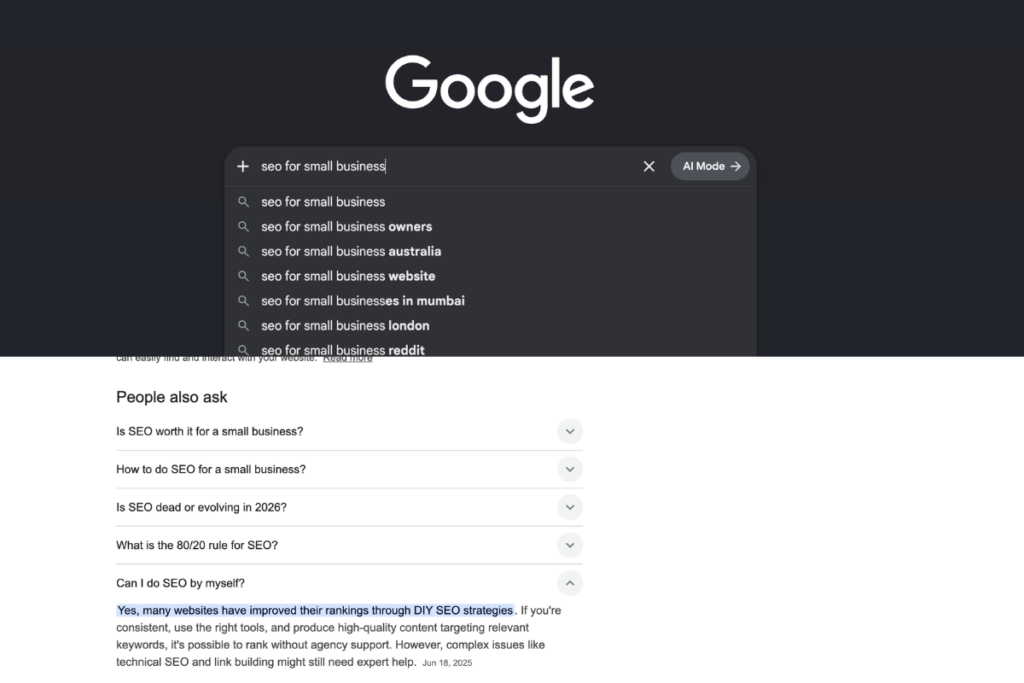
Open a new browser in incognito mode and type the beginning of something your ideal customer might search. For more volume and data, Google’s free Keyword Planner shows you how often specific terms are searched and how competitive they are — you just need a free Google account to access it. Google will auto-suggest completions — those are real searches real people make. Write them down.
Then look at the “People Also Ask” section that appears in the results. Those questions are gold. They tell you exactly what your potential customers are confused about, worried about, or trying to figure out. It’s the same reason doing market research before you build anything matters so much — the questions people type into Google are the questions they’re already asking in their heads before they buy.
For example, if you run a small accounting firm, you might discover that people are searching:
- “how much does an accountant cost for a small business”
- “do I need an accountant or can I use software”
- “accountant vs bookkeeper difference”
Each of those is a potential blog post. Each one is an opportunity to be the business that answers the question — and earns the trust — before anyone else does.
The goal isn’t to go after massive keywords like “accountant” that massive companies already own. The goal is to find specific, lower-competition phrases where you can realistically show up. Smaller surface area. Higher relevance. Better results.
On-Page SEO: The Changes That Actually Move the Needle
Once you know what keywords to target, you need to make sure each page on your website is built around one of them — clearly and intentionally.
On-page SEO is everything you control directly on the page itself. Here’s what matters for small businesses:
Page title and meta description. The title is the blue link people see in search results. The meta description is the short paragraph underneath. Both should include your keyword naturally and give the reader a clear reason to click. Most website builders let you edit these directly — don’t leave them as defaults.
Headings. Google reads your H1 (main heading) and H2s (subheadings) as signals of what a page is about. Your main keyword should appear in your H1 once, naturally. Your H2s should reflect the specific questions or angles your content covers.
The first 100 words. Google pays close attention to the opening of your page. State clearly what the page is about and include your keyword early — not forced, just present.
Internal links. Link from one page on your site to another where it’s relevant. This helps Google understand how your content connects, and keeps visitors moving through your site longer.
Image alt text. Every image on your site should have a brief description written in the alt text field. It helps Google understand what the image shows — and it’s an accessibility requirement too.
None of these are complicated. But most small business websites are missing half of them.
Content Strategy: How You Keep Showing Up Over Time
One-time SEO fixes will only take you so far. What builds real, lasting visibility is consistent content — specifically, content that answers the questions your customers are already asking.
This is where most businesses stop. And it’s where the gap between businesses that grow organically and businesses that don’t becomes very clear.
A simple content strategy for a small business looks like this:
Pick one question your customers ask regularly. Write a clear, honest answer to it. Publish it as a blog post. Repeat once or twice a month.
Over time, each post becomes a page Google can index and rank. Each one is a potential entry point for a new customer. You’re not just building a website — you’re building a library of relevance that compounds over time.
The businesses that do this consistently for 6 to 12 months don’t just rank better. They also build trust faster, because visitors see that the business clearly knows what it’s talking about — and isn’t afraid to share that knowledge. And that trust connects directly to your brand — the way your content and your branding work together is what makes a visitor feel like they’ve found the right business, not just a random result.
One important note: write for your customer first, Google second. If the content is clear, specific, and genuinely useful to a human reader, Google will recognize that. Content that’s written primarily to satisfy an algorithm — stuffed with keywords, padded with fluff — doesn’t work anymore. Google has gotten too good at spotting it.

How Long Does SEO Take for a Small Business?
This is the question everyone asks — and the honest answer is: longer than most people want, but shorter than most people fear if you’re consistent.
For most small businesses, you’ll start seeing meaningful movement in 3 to 6 months. Real, compounding results typically show up at the 6 to 12 month mark. That timeline holds across most industries, competitive landscapes, and starting points.
The businesses that give up at month two — right before things start to work — are the ones that end up back on paid ads forever.
SEO is slow at the start because trust takes time to build. Google isn’t going to hand you first-page rankings before it’s seen enough evidence that your content is worth recommending. But once that trust is built, it holds. A well-ranked page can bring traffic for years without you touching it again.
Paid ads stop the moment you stop paying. SEO keeps giving.
Where to Start if You’re Starting From Zero
If your website hasn’t had a single SEO consideration put into it, don’t panic. Start with the highest-leverage steps first:
Make sure Google can actually find you. Search your business name in Google and see if you show up at all. If you don’t, that’s step one to fix.
Claim and fill out your Google Business Profile completely. For local businesses, this is often the fastest path to visibility — especially in map results.
Pick three to five keywords that describe what you do and where you do it. Build a page around each one. Make sure the title, H1, and first paragraph all include that keyword naturally.
Write one blog post a month that answers a question your customers ask. Don’t make it complicated — just be helpful and clear.
That’s not the full picture of SEO. But it’s enough to start building momentum while you learn the rest. When you’re ready to see how SEO fits into everything else, this beginner’s guide to digital marketing for small businesses connects the bigger picture.
Before You Go — A Question for You
Every business is starting from a different place with SEO. Some have never touched it. Some have tried and felt like nothing worked. Some are just beginning to take it seriously.
Where are you right now with SEO for your business — and what’s the one thing that feels most confusing or overwhelming about it?
Drop it in the comments. I read every one, and I’ll do my best to answer directly.
If you’d like a fresh set of eyes on your current SEO setup — or just want to talk through where to focus first — let’s connect. No sales pitch. Just a straight conversation about what’s holding your visibility back.